Showing posts with label Lead Generation. Show all posts

Sunday, February 22, 2009

How To Add Your Linkedin Profile Button To Your Blogger Blog

In my last post on promoting your Linkedin profile using the Linkedin button, I explained how to grab the Linkedin button code from your profile page. Even had pictures showing how you can make that happen.

Sales people found it very instructional and appreciated the clarity. It saved them time and they didn’t have to go searching around their account looking for stuff. They could go straight to where they needed to go.

However, many of my fellow sales reps have since come to me saying, “Well, I got this code. What do I do with it now? How do I get it into my blog? Why do I want to do this? Can you do it for me?”

If you’ve created your own blog, then adding the Linkedin profile button is very easy. It’s even easier than creating your blog using Blogger. We ran through the steps of creating your blog in the post entitled How To Create A Blogger Blog And Start Creating Sales Leads.

Here is what you do to add your Linkedin profile button on your Blogger blog.

First login to your Google account. After you get logged in, go to www.blogger.com/home. This will get you to your Blogger dashboard where you can select your blog. Once you select your blog, select the “Layout” tab and then click on the “Page Elements” heading.

Adding your Linkedin profile as a gadget in blogger. The first steps.
The Blogger Page Element Layout Section

Find the link that says “Add a Gadget”. You will be adding an element to your blog. Click the link:

Selecting the Blogger Gadget for adding HTML code
Gadget Selection

As you can see, a new window will appear. You will select the type of element to add from what appears in this window. In this instance, hit the plus sign (“+”) next to the element entitled "HTML/JavaScript". This will open up a new window to add in your HTML code:
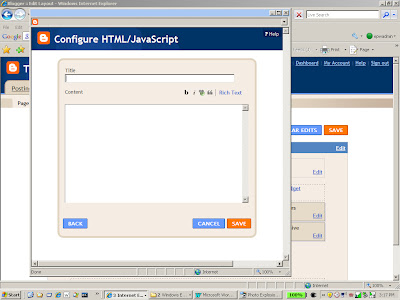
The window that will allow you to add your Linkedin Profile code
The Configure HTML/Javascrip Window

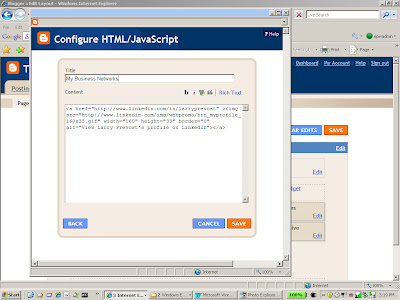
Go collect the HTML code from your Linkedin profile page as we talked about in the post entitled Linkedin Profile Enhancement In Less Than 3 1/2 Minutes and paste the code in as shown:

Adding the Linkedin Profile button code into the HTML Gadget
Adding The button Code from Linkedin

Then add a suitable title:

Provide a suitable title for your Linkedin profile
Adding An Appropriate Title for Your Profile

And hit the save button. Your layout page will look like the following:
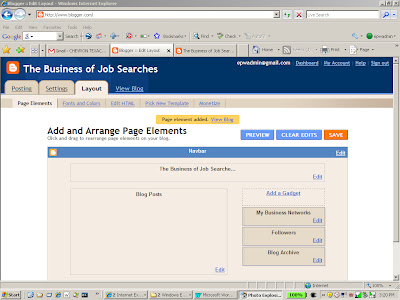
The HTML Gadget in your Blog Layout
The New Gadget is Now In The Page Layout

And if you hit the “View Blog” link, you’ll be able to see your blog with your new Linkedin button:
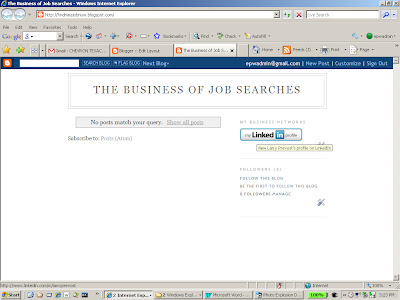
The Linkedin Profile Button on your Blogger blog
What The Linkedin Profile Button Looks Like On Your Blog

And you are ready to go. Just like I said, so easy even a caveman can do it.

We’ll talk about adding other elements later. But for now, realize that this is yet another step in starting your personal sales lead generation program and promoting your expertise.

Friday, February 20, 2009

How To Create A Blogger Blog And Start Creating Sales Leads

Times are getting tough and we’ve seen the unemployment numbers growing.

I’ve seen more and more people out there on the job market and at job fares looking for something, anything, to keep them moving forward.

Incidentally, I’ve also seen a number of questions from sales people in the Manta sales community asking the same questions about finding suitable leads for prospecting. Questions like, “Where can I find real estate leads?” or “How can I get viable leads for cars?” or “How do I sell my stuff when no one is buying anything?”

This tells me a couple of things.

  1. Sales managers are coming down hard on sales people to produce and increase revenue.

  2. Sales people are looking for ways to increase their production.

  3. Sales people are looking for ways to find viable leads.

  4. Sales people are using the same old tired and unproductive methods of generating those leads.
There are no quick fixes or shortcuts that sales people can take to get them to the top of the mountain. There are no magic words or phrases that a salesperson can utter and have their prospect eating out of their hands. But I do think that there are words and phrases that salespeople can utter that will cost them the sale. I do think that there are things that salespeople can do that will cause their prospects to run to the competition. It’s less about finding shortcuts and more about eliminating bad, inefficient behaviors or ineffective activities.

Here is something to do that will help establish your credibility and reduce some of those bad and inefficient behaviors.

Write a blog.

Yes, maintain a blog. I’ve recommended to several people that if they are looking to generate leads, increase their visibility and enhance their credibility, the best and fastest way to do that is by getting themselves published on the web. When your prospects go to Google looking to solve their problems, you want your name and your solution to pop up. You want their mindshare when they are on the web looking to solve their problems. And these ‘problems’ can be anything from “what should I look for when buying a used car?” to “Where can I find a prospective employee?”

Unfortunately, most sales people don’t write or maintain a blog because they associate blogs with technical wizardry. It takes to much time. It’s too complicated. There’s too much technical trouble involved.

Well, this just isn’t true.

The tools available today make web publishing so easy, even the proverbial caveman can do it.

So if you are just starting out in sales, a seasoned sales veteran, an entrepreneur running a small business or unemployed looking for your next gig, here is a quick and dirty start to blogging using the Google web-publishing tool, Blogger to promoting your ideas and get yourself known.

First, you will need to access your gmail account. Google centralizes all of it various services around specific accounts. So if you have a gmail account, you can access several other Google services and Blogger is one of them.

So sign in to your Google account as if you were signing into your gmail. Then when the Google page comes up, open the page www.blogger.com and sign in using your Gmail name and password. Here I am logging in as my favorite defunct login, epwadmin.

Use Blogger to build your Lead Generation Program
Logging into Blogger

When I get in, you can see that this is my first time. I have no blogs created. The first step is to begin to create your first blog so hit the “create your blog now” button to get started.

Use Blogger to build your Lead Generation Program
The First Step, Getting Started

The next step is naming your blog. Here, you can see that I’ve taken the job hunting route and called the blog “The Business of Job Searches” (hey, job hunting is a sales exercise as well. And very popular right about now).

For the Domain name, I’ve taken the name “Findmeajob”. Here’s where things get a little tricky. You want the Domain Name to reflect the type of business or the interest as closely as possible. It will have a big impact on how your blog pops up on searches when searchers type in their search query.

Use Blogger to build your Lead Generation Program
Creating The Name and Domain Name of your blog

The tricky part arrives when you have a popular search term and someone else has already grabbed that domain name

Use Blogger to build your Lead Generation Program
If your Name is taken, Blogger will tell you to create a new one

So a different Domain Name has to be selected.

Use Blogger to Enhance your Cold Calling Strategy
Name and Domain Name creation

Domain Name selection can be a critical factor in determining your blog placement when your prospects perform their searches. If I were writing a blog on my expertise on selling cars, then having a domain name containing the words “car” and “sales” would be preferable to a name like “moondog.com”.

Once you have the Domain Name set, type in the word verification. This essentially tells the system that a human being is setting this up and not an automatic bot.

Use Blogger to Enhance your Cold Calling Strategy
Word Verification

Once you all of the information set up, click the continue button to get to the next page.

Use Blogger to Enhance your Cold Calling Strategy
Template Selection

Now you have an opportunity to pick a template. This supplies the general look and feel of your blog. Once this is selected, all you have to do in the future is type in your content and not set up each page separately. Don’t worry. You can always select a different template at a later date. For this example, we’ll just select the first template. Once you have the template selected, click continue:

Use Blogger to Enhance your Cold Calling Strategy
Blog is ready. Time to get started.

And you are done. Now when you click the “start blogging” you are ready to start.

Use Blogger to Enhance your Cold Calling Strategy
Blogger Content Form

At this point, you can start putting in your content supply a title for your posts in the “Title” box and your content in the bigger box below. And you are in business.

If you click the “view content” link, you will see what your blog looks like to the rest of the world:

Use Blogger to Enhance your Cold Calling Strategy
The way your Blogger blog appears to the online community

This will get you started building the skeleton of the blog. There will be other considerations such as titles (see the post on what needs to be in the title to make the search engines happy) and content. But it’s been my experience that sales people have more of a challenge just getting started. Why? Because they feel that starting a blog is a technical exercise and they use that to keep them from exploring this avenue for cultivating leads.

Another recommendation here. Under your account, you can set up multiple blogs. I would recommend one of the first domain names you set up be your name.

Next step is to begin writing on your expertise to attract those looking for solutions.