Showing posts with label social networks. Show all posts

Tuesday, November 24, 2009

Twitter Application Hootsuite Is Now A Social Network Communication Hub


Hootsuite Updated To Interface With LinkedIn And Facebook


Last night, I noticed that the 3rd party professional Twitter application Hootsuite went offline for maintenance. I really didn’t think much of it initially. Services like this go offline occasionally for routine maintenance and upgrades. But after 6 hours of not being able to connect to it, I knew something big was in the works.


Over the past few weeks, Twitter has made some major additions, one of them being the addition of lists. Professional Twitter desktop applications like Tweetdeck, and Seesmic recently made modifications to accommodate these updates, everything from the new way Twitter handles retweets to connecting with other social networks like Linkedin.

When Hootsuite came back online this morning, there were plenty of changes integrated into its structure. Now, not only does Hootsuite manages and organizes your Twitter lists, but it also interfaces to your Linkedin and Facebook accounts. This opens a host of possibilities which I’m sure we’ll explore in the coming weeks.

I’m sure that there were some other changes and upgrades integrated into Hootsuite to make it more stable and increase its flexibility. And I’m also fairly sure that there will be a few… surprises that we’ll stumble across as we move forward—you can’t make a major upgrade like this without a few oversights. But, these latest upgrades, coupled with some of the other features that were already integrated into the application, turns Hootsuite into a powerful social network communication platform.

You can find more descriptions of the Hootsuite upgrades on their blog here.

Monday, September 7, 2009

Free Social Media Icons For Your Blog

In a past post, I demonstrated how to acquire a badge from Linkedin and install the HTML code in your Blogger blog.


A number of you out there made good of that code and put it to immediate use.


Here’s what you need to know.

Facebook also offers a badge.


Plaxo offers a badge as well.


And Twitter gives you the opportunity to create a window into your tweets right on your blog.


The downside for some of these badges is that they take up a lot of real estate on your blog.


In perusing some of the other blogs out there and getting some insight from my friend Lewis Howes, I discovered a way to shorten down the badges into a few well recognized icons that will still allow your followers to follow you on your favorite social network.


For an example of what I’m talking about, see the sidebar on the right hand side with my social network connections on Linkedin, Facebook and Twitter. I’m still working on YouTube.


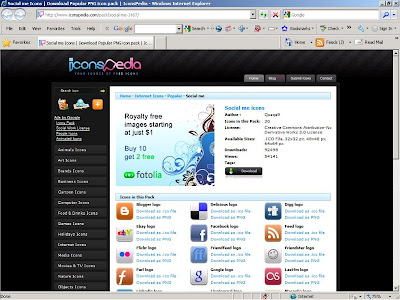
Before we talk about putting the connections into your Blogger blog, you will need to collect the social media icons. You can find these icons at a site called Iconspedia. These icons are subject to the creative commons license. While you can use them free of charge, don't alter the image as the logos belong to the respective companies. Still, for promoting your own personal brand and expanding your social networks, they can't be beat.


When you pull up the site, you’ll notice a bunch of different icon classes. The ones that we will use are the social media icons. You can find them by going to the catalog on the left-hand side and locating the “Internet Icons”. When clicked, it will expand to show your options. Click on the entry entitled “Popular” and then you will see a bunch of selections in the middle window pane.


The ones that we’ll use in the next blog post are in the “Social me” entry. Of course there are a number of other interesting entries and you can get innovative when creating the look and feel of your blog. What we will discuss can be transferred to any of the other icons.


But for now, hit the download button and you will begin downloading a zip file with all of the icons listed. For the “Social me” pack, that would be thirty, including icons for Linkedin, Twitter, Facebook and YouTube.


Be sure to place the zip file in a location where you will have easy access, and after it has finished downloading, go to the file location, double click the file and unpack the icons out of the zip file. This should be fairly straight forward, but if you have trouble, leave a message below and let me know.


You will end up with four variations of every icon: one file will be an ICO file type, and the other three will be of file type PNG in three different sizes, 32 pixels, 48 pixels, and 64 pixels wide.


The ones I’m using on the right side bar are 32 pixels wide.


Once you have these icons extracted, come back for the next post when we’ll look at how to put these into your Blogger blog with the appropriate social network.


Good Selling.